

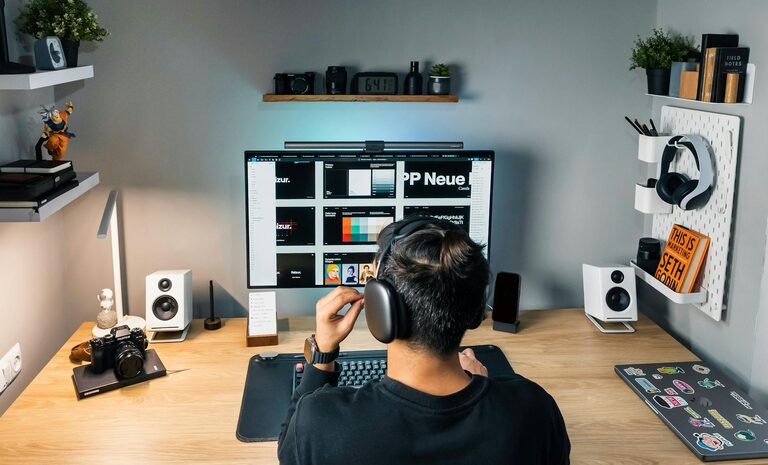
Working from home has become a common reality for many people, and having a well-organized workspace can make all the difference in productivity and comfort. Whether you have a dedicated room or just a small corner of your living space, creating an efficient and inspiring work environment is key. In this post, we’ll share practical tips to help you organize a productive home workspace that keeps distractions at bay and encourages focus.
Why a Dedicated Workspace Matters
When your home doubles as your office, separating work from personal life is crucial. A designated workspace not only helps you mentally switch into work mode but also reduces the temptation to procrastinate. It sends a clear signal to your brain that it’s time to focus, improving concentration and output.
Choosing the Right Location
Selecting where to set up your workspace is the first step. Here are some things to consider:
– Natural light: Position your desk near a window if possible. Natural light boosts mood and energy.
– Quiet environment: Find a spot with minimal noise and distractions.
– Space: Ensure there’s enough room for your computer, supplies, and comfortable seating.
– Privacy: If you live with others, a private or semi-private area helps reduce interruptions.
Essentials for an Organized Workspace
Having the right tools and keeping them accessible keeps your workflow smooth. Consider the following essentials:
– Desk: A stable, appropriately sized desk suited to your needs.
– Chair: An ergonomic chair to support your posture and comfort during long hours.
– Storage: Shelves, drawers, or organizers to keep supplies neatly stored.
– Lighting: Task lighting, like a desk lamp, to reduce eye strain.
– Tech setup: Monitor, keyboard, mouse, and chargers arranged neatly.
Decluttering and Maintaining Order
Clutter can severely impact productivity, so it’s important to maintain an organized space.
Tips for decluttering:
– Clear desk policy: Keep only daily-use items on your desk.
– Use containers: Small trays or boxes keep pens, clips, and notes tidy.
– Regular clean-up: Spend a few minutes at the end of each day tidying up the workspace.
– Sort paperwork: Use filing systems or digitalize documents to reduce paper stacks.
Personalizing Your Workspace
Adding a personal touch can make your workspace inviting and motivating without causing distractions.
– Display one or two meaningful items like a plant or a photo.
– Use calming colors or artwork that inspires you.
– Keep it simple—too many decorations can create visual clutter.
Creating a Routine to Enhance Productivity
Organizing your space goes hand in hand with establishing productive habits.
– Set specific work hours.
– Take regular breaks to stretch or move around.
– Keep a to-do list visible to stay on track.
– Avoid multitasking by focusing on one task at a time.
Ergonomics and Comfort
Working comfortably prevents physical strain and helps maintain long-term productivity.
– Position your monitor at eye level.
– Keep your feet flat on the floor or use a footrest.
– Adjust your chair height so your elbows are at 90 degrees while typing.
– Use wrist rests if needed to reduce strain.
Technology Tips for a Smooth Workflow
Organize your digital workspace as well:
– Keep your desktop tidy with folders and minimal icons.
– Use apps or tools for task management and reminders.
– Ensure cables are managed with clips or organizers to avoid tangling.
Final Thoughts
A productive home workspace is a blend of a well-chosen location, organized tools, and thoughtful design tailored to your needs. By dedicating time to set up and maintain your workspace, you create an environment that supports focus, reduces stress, and enhances your overall work-from-home experience. Start small, make gradual improvements, and watch your productivity soar!
—
Creating an organized home workspace takes some planning, but the benefits are worth it. With these tips, you’ll be well on your way to a comfortable and efficient area that helps you do your best work every day.